 Codiedev
New vulnerabilities are found faster than most teams can patch them, and a yearly pentest only tells you about one week of your code.
This template is a small agent that runs every day on your own repos. It keeps dependencies patched, and once a week it reads part of your code the way an attacker would, tries to chain small bugs into a real break-in, and throws away anything a second, independent check can't confirm. What's left becomes a pull request or a GitHub issue.
It only reads code. Nothing is executed and nothing is sent to your running app.
What you're building
Every run sends a report to your Codiedev inbox, and to Slack if you set it up. It includes what the agent checked and ruled out, so there's a record either way.
What you need
- A Codiedev account with Agents on. We used the default model, GLM 5.3 Flash, for every pass.
- Claude Code, Codex, Cursor or another coding agent, with the Codiedev CLI installed (
npm i -g codiedev@latest). You do every step by telling your coding agent what you want; the commands are there if you'd rather run them yourself. - A GitHub token for your repos (Step 4). The first runs don't need one.
Step 1: Get the template
Set up the Codiedev pentest agent template from
github.com/Signal-and-Code/pentest-agent-template in ./my-pentest-agent, read
its README and AGENTS.md, and deploy it in dry-run mode pointed at
snyk-labs/nodejs-goof, reviewing 2 entry points a week.git clone https://github.com/Signal-and-Code/pentest-agent-template my-pentest-agent
cd my-pentest-agent && cp .env.example .env
codiedev agents deploy
codiedev agents secrets pentest-agent set REPOS=snyk-labs/nodejs-goof DRY_RUN=1 REVIEW_FILES_PER_WEEK=2.env starts with DRY_RUN=1, which does everything except open pull requests and issues; it prints them instead. Keep it on until you've read a few reports.
Start on an app that's vulnerable on purpose, so you can see it find real problems before pointing it at your code. We used Snyk's nodejs-goof.
Step 2: Run the dependency check
Run the pentest agent's dependency check now and summarize what it found.codiedev agents run pentest-agent --input '{"only": "deps"}'snyk-labs/nodejs-goof: 150 vulnerable packages, 100 fixable in place, 45 need a major upgrade
[dry run] would open a PR on snyk-labs/nodejs-goof: security: fix 100 vulnerable dependencies
| Package | Severity | Advisory | Fix |
| lodash | critical | Prototype Pollution in lodash | lodash@4.18.1 |
| elliptic | critical | Elliptic Uses a Broken or Risky Algorithm | same-major … |
…
[dry run] would ask a person about 45 major upgradesIt sorts each fix into one of two groups:
- Fixes within the same major version go straight into one PR, made with
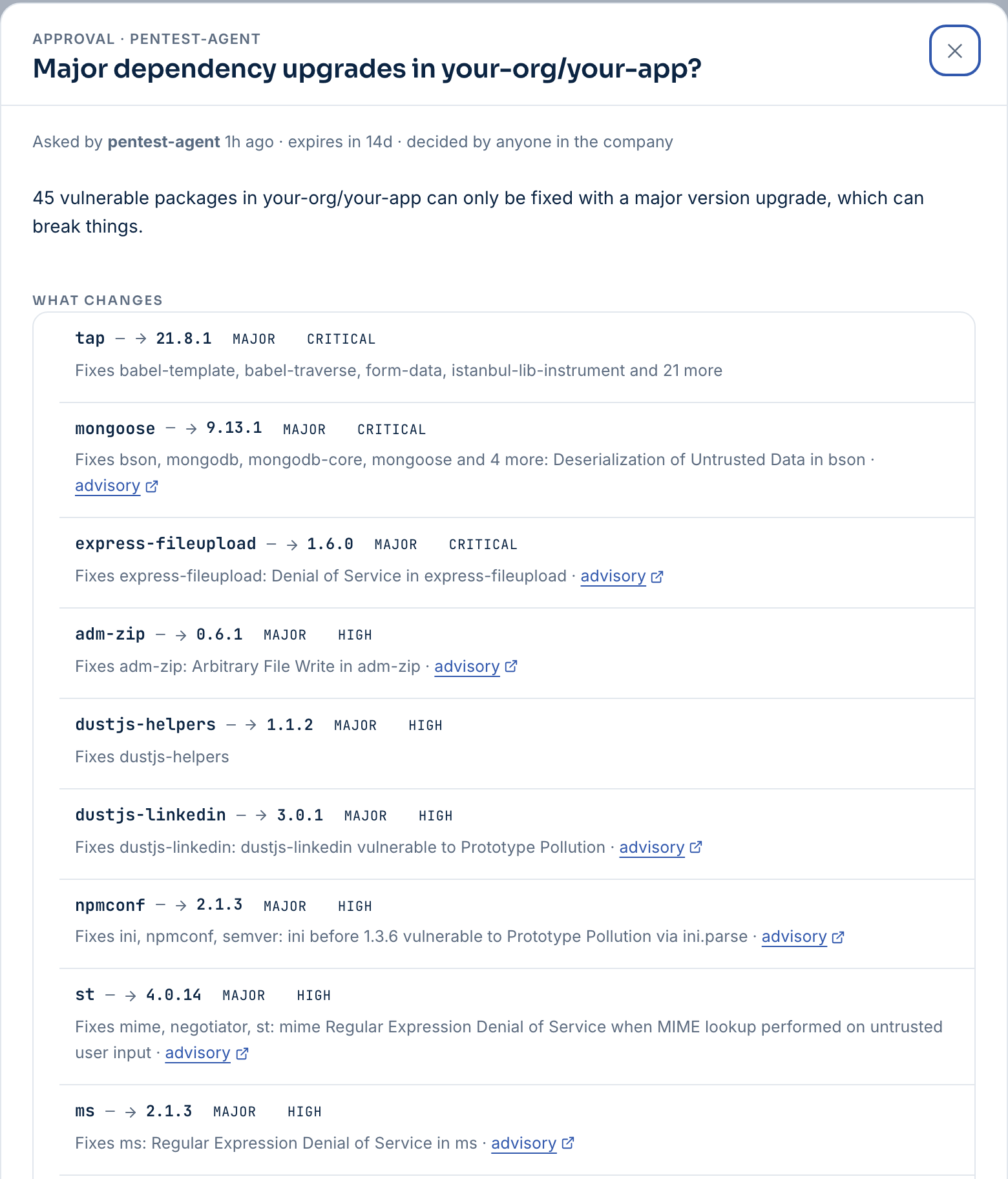
npm audit fix --package-lock-only. Your CI on that PR is the test. - Fixes that need a major upgrade can break things, so it asks first. Approving opens a second PR with just those upgrades. Rejecting leaves them alone, and it won't ask about the same set again for 14 days.
This is the approval for nodejs-goof. npm often fixes a deep dependency by upgrading its parent, so each row is a package to upgrade, with what it fixes:
The check covers npm. For other ecosystems, swap audit() in deps.py for pip-audit, cargo audit or osv-scanner.
Step 3: Run the code review
The review runs once a week on REVIEW_DAY. To run it now:
Run the pentest agent's code review now. When it finishes, show me the confirmed
findings, what the verifier rejected, and what it ruled out.codiedev agents run pentest-agent --input '{"review": true}'It works in three passes:
- Review. For each of this week's entry points (API routes, handlers), a model with read-only tools (read a file, search, list a folder) follows the code the route calls, looking for ways in.
- Attack. One open-ended pass gets every lead from the review, including the suspicions that were ruled out, and tries to chain them. Most real breaches are two or three small bugs together.
- Verify. Duplicates are merged, then every finding goes to a separate check that must trace it through the real code or reject it.
On nodejs-goof, our run took about 7 minutes and $0.10 in model calls:
snyk-labs/nodejs-goof: reviewing app.js, routes/index.js
  reviewed routes/index.js: 11 findings, 8 ruled out
  attack pass: 4 findings
  verifying 17 unique findings (11 duplicates merged)

code review of 2 entry points: 16 confirmed, 1 rejected by the verifier, 20 ruled out
  [critical] Remote code execution via dust.js template engine in /about_new (routes/index.js:313)
  [critical] Command injection / ImageTragick RCE in todo creation (routes/index.js:174)
  [critical] NoSQL injection login bypass into the admin area (routes/index.js:52)
  [critical] Prototype pollution chain → full admin authentication bypass (routes/index.js:129)
  [high] Path traversal (Zip Slip) in file import (routes/index.js:270)
  …
  rejected: Cross-site scripting via Handlebars template in account_details: Handlebars' default
    {{...}} escaping HTML-encodes double quotes…
  ruled out: SQL injection in routes/users.js: repo.find() and repo.save() go through TypeORM's
    parameterized query builder…
Three things worth noticing:
- The attack pass found a chain. Prototype pollution in the chat handler can set
loggedInon every object, which then gets a request past the admin check. Neither bug looks critical on its own. - The verifier earns its keep. It rejected an XSS claim because the template engine escapes the value, and said exactly why.
- "Ruled out" is part of the report. You can see what it looked at and why it stopped, so a quiet week still tells you something.
Confirmed findings of medium severity or worse become GitHub issues, one per finding, with the attacker's starting point, each step with file and line, the impact, the smallest fix, and the verifier's reasoning. A finding that's already been filed isn't filed again.
Step 4: Point it at your repos
Point my pentest agent at <your-org/app> and <your-org/api>. Help me make a
fine-grained GitHub token with only the permissions it needs, set it as an agent
secret, and run one dry-run report on our code before turning dry run off.codiedev agents secrets pentest-agent set REPOS=your-org/app,your-org/api GITHUB_TOKEN=github_pat_…Use a fine-grained token with Contents, Pull requests and Issues set to read and write, on only those repos. For an organization, a GitHub App with the same permissions is better: its tokens last an hour, and its commits and issues show up as the app instead of a person.
Read one dry-run report on your own code, then turn it on:
codiedev agents secrets pentest-agent set DRY_RUN=0It runs once a day from the time you deployed. Each week's review covers the next REVIEW_FILES_PER_WEEK entry points, picking up where the last one stopped, so over a few weeks it works through the whole app without a big bill in any one week.
Step 5: Make it yours
| Change | How |
|---|---|
| Review day and pace | REVIEW_DAY (mon–sun), REVIEW_FILES_PER_WEEK |
| What counts as an entry point | ENTRY in review.py, a pattern on file paths |
| What it hunts for | REVIEW_SYSTEM and ATTACK_SYSTEM in review.py |
| How strict the verifier is | VERIFY_SYSTEM in review.py |
| Other dependency ecosystems | audit() in deps.py |
| Models | REVIEW_MODEL, ATTACK_MODEL |
| Slack report | SLACK_WEBHOOK_URL, an incoming webhook |
Your coding agent can tune it for your stack:
Tune this pentest agent for our codebase, <your-org/your-app>.

1. Look at how our app defines routes and handlers, and update ENTRY in
   review.py so it matches our entry points and nothing else.
2. Add what matters for us to REVIEW_SYSTEM: our auth middleware is <name>, every
   query must be scoped by <tenant field>, and admin routes live under <path>.
3. Run it locally with DRY_RUN=1 and {"only": "review"} and show me the report.
A note on models
Some closed models refuse the attack pass as an offensive security task, even on your own code. If yours does, set ATTACK_MODEL to an open model your company allows; GLM worked for us. The review and verify passes are ordinary code review, and any capable model handles them.
Where to take it next
- Fix PRs for code findings. Hand each confirmed finding to a coding agent in a sandbox (the software factory template shows how) and open a PR with the fix and a test that proves the bug is gone.
- Review every PR. Trigger a review of just the changed files from a GitHub webhook, with the same verifier.
- Watch for new advisories. Point a vulnerability feed at the agent's webhook so a new CVE in one of your dependencies starts a run the same day.
If you get stuck, reach out to support in the portal and we'll help you set it up.
Build your own agent next.
Start from this template or from scratch. Models, sandboxes, approvals and traces are built in, so you describe the agent to your coding agent and Codiedev runs it.
Request a demo