 Codiedev
Most small changes don't need a developer to open their laptop. Someone notices the settings page needs a dark mode toggle, writes it down, and it sits in a backlog for a week.
This template turns that message into a pull request. Mention the bot in Slack with what you want. A minute later it replies in the thread with screenshots of the change and a link to the PR. Reply in the same thread to adjust it, and it updates the same PR.
Nothing merges on its own. It opens a pull request like anyone else, and your normal review and CI decide what ships.
What you're building
Each request runs in its own fresh cloud sandbox on Codiedev, which is destroyed afterwards. Model calls go through your Codiedev gateway, so they're traced and count against the agent's budget, and you can stop it with one command.
What you need
- A Codiedev account with Agents on, and a coding model your company allows. We used Claude Sonnet 4.6.
- Claude Code, Codex, Cursor or another coding agent, with the Codiedev CLI installed (
npm i -g codiedev@latest). You do every step by telling your coding agent what you want; the commands are there if you'd rather run them yourself. - To connect it for real: a GitHub repo, and permission to add an app to a Slack workspace. You can try everything before that.
Step 1: Try it on the demo app
The template ships with a tiny web app (a dashboard and a settings page), so the first run needs no GitHub or Slack. With no Slack token, it prints its replies instead of posting them, and the demo app is never pushed anywhere.
Set up the Codiedev software factory template from
github.com/Signal-and-Code/software-factory-template in ./factory, read its
README and AGENTS.md, deploy it, and ask it to add a dark mode toggle to the
demo app's settings page that remembers the choice. Show me the screenshots.git clone https://github.com/Signal-and-Code/software-factory-template factory
cd factory
codiedev agents deploy
codiedev agents run software-factory \
--input '{"request": "add a dark mode toggle to the settings page that remembers the choice"}'This is the settings page before the request:
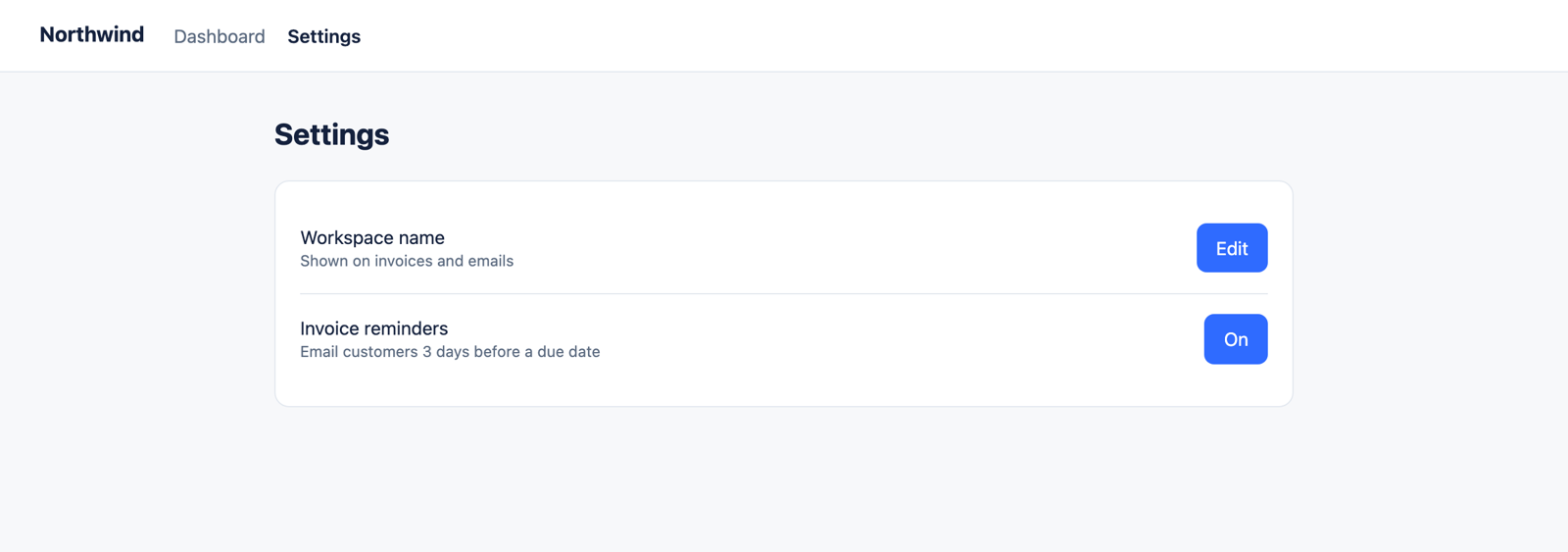
And this is what our run printed, a minute later:
codie (anthropic/claude-sonnet-4.6) on bundle:demo-app: add a dark mode toggle to the settings page…
codie finished in 38s
tests passed
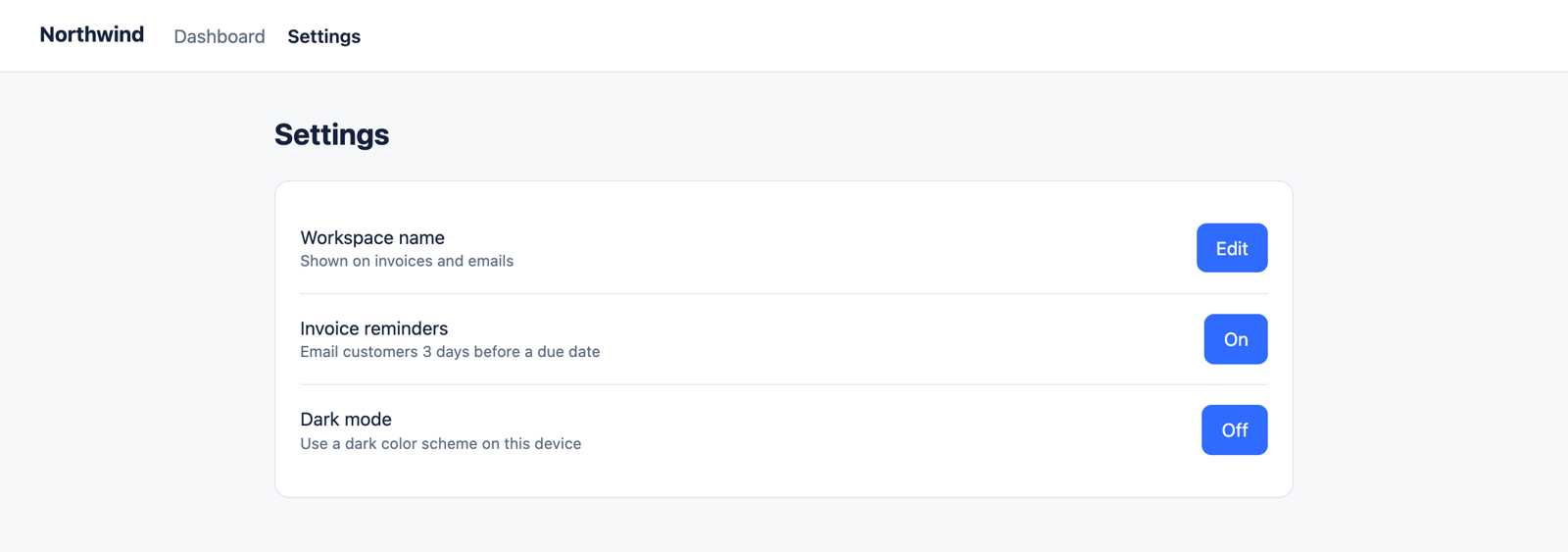
[slack thread] Added a "Dark mode" row with an On/Off toggle to the settings page. The choice is
saved in localStorage and applied on every page through a small theme.js…
tests passed · 4 files changed, 15 insertions(+)
  + 01-settings.png
  + 02-home.png
The coding agent also added a test for the toggle on its own, because the prompt asks it to keep the tests passing and add one when the change is testable.
Step 2: Ask for a follow-up
Replies in the same Slack thread continue on the same branch and PR. Without Slack, give both runs the same thread:
Ask the software factory, in the same thread as before, to make the dark mode
toggle a proper switch instead of a button.codiedev agents run software-factory --input '{"thread": "t1", "request": "add a dark mode toggle to settings"}'
codiedev agents run software-factory --input '{"thread": "t1", "request": "make the toggle a proper switch instead of a button"}'[slack thread t1] Picking this up again on the same PR.
tests passed
[slack thread t1] The dark mode control on the Settings page is now a proper switch instead of an
"On/Off" text button. It keeps the same <button> element but uses role="switch" with aria-checked…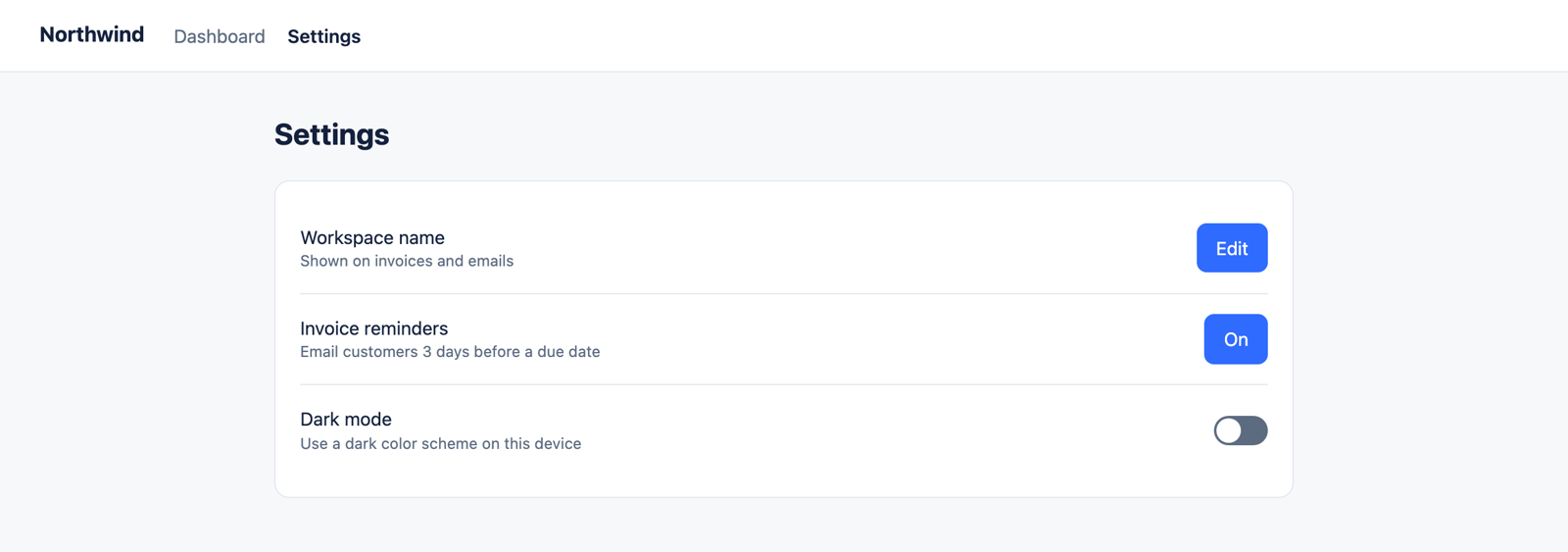
On the demo app each run starts fresh, because there's no remote to push to. On your repo, the follow-up fetches the thread's branch and commits on top of it.
Step 3: Point it at your repo
Point my software factory at <your-org/your-app>. Work out from the repo how to
install, test and start the app and which port it uses, set those as agent
secrets, help me make a GitHub token that can only push branches and open PRs
on that repo, and run one small request to check it.codiedev agents secrets software-factory set TARGET_REPO=your-org/your-app GITHUB_TOKEN=github_pat_…
codiedev agents secrets software-factory set INSTALL_COMMAND="npm ci" TEST_COMMAND="npm test" \
START_COMMAND="npm run dev" APP_PORT=3000Use a fine-grained GitHub token with Contents and Pull requests set to read and write, on that one repo. The agent pushes to a factory/… branch and opens a PR against your default branch; it never pushes to the default branch itself.
Run a request from the terminal again before you add Slack. With no Slack token it still opens the real PR, and prints the reply it would have posted.
Step 4: Add the Slack app
Get my software factory's webhook URL and put it into slack-app-manifest.yaml,
then walk me through creating the Slack app from it. When I paste the signing
secret and bot token, set them as agent secrets.
The steps, if you're doing it by hand (codiedev agents webhook software-factory prints the URL):
- Go to api.slack.com/apps → Create New App → From a manifest, and paste
slack-app-manifest.yamlfrom the repo, with your webhook URL as therequest_url. - Install the app to your workspace.
- Copy the Signing Secret (Basic Information) and the Bot User OAuth Token (OAuth & Permissions) into the agent:
codiedev agents secrets software-factory set SLACK_SIGNING_SECRET=… SLACK_BOT_TOKEN=xoxb-…- Invite
@factoryto a channel and ask it for something.
The manifest asks for five permissions: read mentions, read the thread for context, post replies, and upload the screenshots. The agent checks Slack's signature on every request, so nothing else can start it, and it ignores Slack's automatic retries so one message never starts two runs.
Step 5: Make it yours
| Change | How |
|---|---|
| The coding model | CODING_MODEL (codiedev agents models lists yours) |
| The coding engine | CODING_HARNESS: opencode (default) or pi |
| Your conventions | Add them to the prompt in agent.py, or tell it to read your AGENTS.md or CLAUDE.md first |
| Which pages get screenshotted | The coding agent lists them in .factory/pages.txt; change the instruction in the prompt |
| Pages behind a login | Sign in at the top of shoot.mjs with a test account from secrets |
| Ask a person before the PR | Add agents.request_approval() before the push, like the support agent template |
| Who can use it | Check event["user"] against a list before doing anything |
Your coding agent can adapt it for your app:
Adapt this software-factory agent for our app, <your-org/your-app>.

1. Read our repo's README and package.json and work out the install, test and
   start commands and the port. Set them as agent secrets.
2. If pages need a login, add a sign-in step to shoot.mjs using TEST_EMAIL and
   TEST_PASSWORD secrets (I'll create a test account).
3. Add our conventions to the prompt in agent.py: read AGENTS.md first, use our
   component library, keep changes small.
4. Run one request locally on a small change and show me the screenshots.
How it works
The coding agent is Codie, Codiedev's coding harness: the same codie your developers run on their laptops, installed with the agent's packages. It runs on OpenCode by default, or on pi when you set the CODING_HARNESS secret to pi. Both get the same models, billing and tracing. Inside a run it signs in with the agent's own key, only offers the models your company approved, and puts every model call on this run's bill, so each request shows exactly what it cost in Codiedev. There's no config to write:
model = ["--model", f"codiedev/{CODING_MODEL}"] if CODING_MODEL else []
harness = ["--pi", "-p"] if CODING_HARNESS == "pi" else ["run"]
sh([os.path.join(BIN, "codie"), *harness, *model, prompt], repo_dir, timeout=20 * 60, check=False)
The prompt asks Codie for two files besides the change: .factory/pages.txt, the pages a reviewer should look at, and .factory/summary.md, a few sentences for the PR and the Slack reply. The agent screenshots those pages with Playwright, removes both files before committing, and keeps a thread → branch → PR map in agents.state so follow-ups land on the same PR.
One thing we learned building it: the sandbox is a slim Debian image. Chromium needs libnss3, so the agent installs it with apt-get before taking screenshots, which takes about three seconds.
Where to take it next
- Preview deployments. If your repo deploys previews (Vercel, Netlify), wait for the preview URL and screenshot that instead of starting the app in the sandbox.
- Let it read the issue. Mention a ticket ID in the request and have the agent fetch the ticket for context.
- Review the review. Add the PR's CI result to the Slack thread when it finishes, so the person who asked knows when it's ready to merge.
If you get stuck, reach out to support in the portal and we'll help you set it up.
Build your own agent next.
Start from this template or from scratch. Models, sandboxes, approvals and traces are built in, so you describe the agent to your coding agent and Codiedev runs it.
Request a demo