 Codiedev
Most teams want an AI to help with support, and almost none want it talking to customers on its own.
This template sits in between. An agent reads every new ticket, labels it, and drafts a reply from your docs and the customer's history. Then it stops and waits. A person reads the draft, fixes anything that's off, and clicks Send. Nothing goes out without them.
It ships with a fake help desk, so you can try the whole loop in a few minutes with nothing but a Codiedev account, then switch to Zendesk or Intercom when it looks right.
What you're building
For each ticket the agent:
- reads the ticket, the customer's past tickets, and the matching pages of your help center
- masks card and phone numbers before anything reaches a model
- sets a priority, a category and a few tags on the ticket right away (internal only)
- asks a person in Codiedev, with the draft in an editable box
- posts whatever they approved, or leaves a note for the team if they reject it
What you need
- A Codiedev account with Agents on. Any model your company allows works; we used the default, GLM 5.3 Flash.
- Claude Code, Codex, Cursor or another coding agent, with the Codiedev CLI installed (
npm i -g codiedev@latest). You do every step below by telling your coding agent what you want; the commands are there if you'd rather run them yourself.
Step 1: Get the template and try it
Set up the Codiedev support agent template from
github.com/Signal-and-Code/support-agent-template in ./my-support-agent.
Read its README and AGENTS.md, then try it on the sample refund ticket on my
machine and show me how it triaged the ticket and what reply it drafted.git clone https://github.com/Signal-and-Code/support-agent-template my-support-agent
cd my-support-agent && cp .env.example .env
codiedev agents run --local --input-file samples/refund.jsonThe folder is small: agent.py is the flow, helpdesk.py talks to the help desk, knowledge.py finds the right docs, and docs/ is a sample help center for a made-up product called Northwind Invoicing.
Step 2: Read the first draft
The sample ticket is a customer who was charged twice and included their card number and phone number. Here's what our run printed:
2207: p3 billing · Customer reports a second $49 Team plan charge on Nov 3, likely a pending
authorization from a failed card retry; advise the 5-business-day wait, then refund if it persists.
[fake help desk] triage on 2207: {"priority": "p3", "category": "billing",
  "tags": ["duplicate-charge", "refund", "team-plan"]}
[local] approval requested: Send this reply to sam@example.com? (p3, billing) (send, reject);
  not sent on a local run
Three things worth noticing in the full output:
- The draft cites Billing: Duplicate charges, the one doc that answers it. The agent only uses your docs and says a teammate will follow up when they don't cover something.
- It used the customer's history. Sam had a declined card last month, and the draft mentions it because that's the likely cause.
- The model never saw the card or phone number. They reach it as
[card ending 4242]and[phone].
It also writes a note for whoever approves it:
Check before sending: Confirm the Nov 3 charges on the Billing page before promising any
refund. The doc only commits to a refund after the 5-business-day window has passed.
Step 3: Deploy it and send it a ticket
Deploy the support agent to Codiedev. Give it a random shared secret and a
webhook, then use fake_helpdesk/send_ticket.py to send it samples/how-to.json
the way a help desk would, and show me the run.codiedev agents deploy
codiedev agents secrets support-agent set SHARED_SECRET=$(openssl rand -hex 16)
codiedev agents webhook support-agent
SHARED_SECRET=… python fake_helpdesk/send_ticket.py <webhook-url> samples/how-to.jsonThe webhook is the URL your help desk will call. The shared secret means only a sender that knows it can start a run; anything else gets a 401 and isn't retried.
200 {"runId":"vn8hk36s…","status":"queued"}2208: p3 billing · Customer's Export button is greyed out, which per docs happens on the
Starter plan; exports require Team or Business.
[fake help desk] triage on 2208: {"priority": "p3", "category": "billing",
"tags": ["export", "starter-plan", "upgrade"]}
Waiting for a person: https://codiedev.com/portal/agents?approval=…Step 4: Approve the draft
The draft is now in Agents → Approvals in Codiedev, and at the link the run printed. This is what the approver sees for the refund ticket:
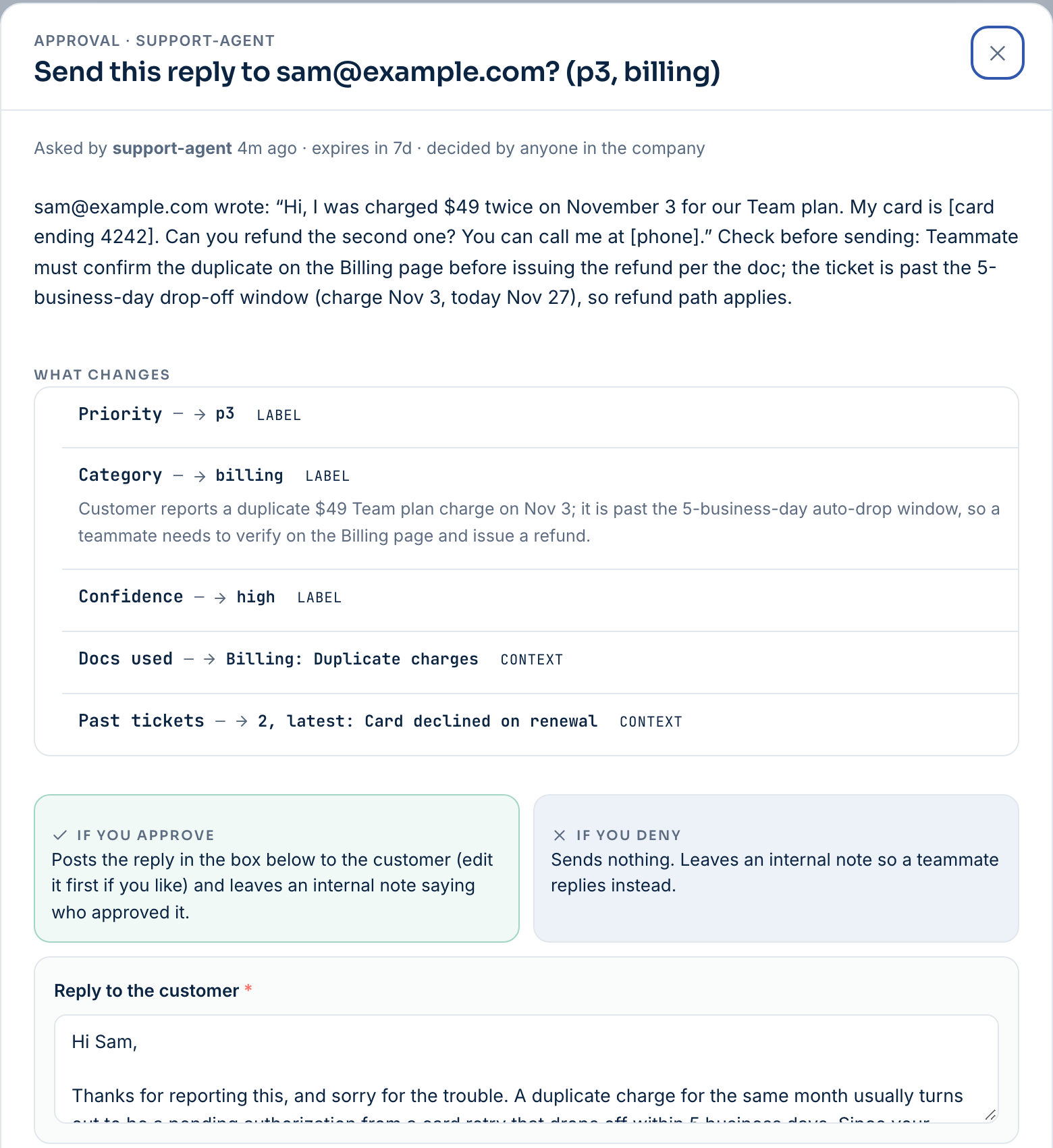
The reply is in an editable box at the bottom. Change anything, then pick:
- Send: posts the reply exactly as it is in the box, and adds an internal note saying who approved it and whether they edited it.
- Reject: sends nothing and leaves a note for the team, with the approver's comment if they wrote one.
You can also decide from your coding agent ("show me the support drafts waiting for me and send the first one"), or with codiedev agents approvals and codiedev agents decide <id> send.
The decision starts a second, short run of the same agent that does the posting:
[fake help desk] reply on 2208: {"text": "Hi Priya,\n\nThe Export button is greyed out because…"}
[fake help desk] note on 2208: {"text": "Reply approved by you@yourcompany.com with edits."}
Nothing is running while the draft waits, so it costs nothing to leave it overnight. Drafts nobody decides on expire after 7 days and leave a note on the ticket.
Step 5: Make it yours
| Change | How |
|---|---|
| Your product name and sign-off | PRODUCT_NAME and SIGNATURE secrets |
| Your help center | Replace docs/ with your articles, one Markdown file each |
| Your help desk | HELPDESK=zendesk or intercom (Step 6), or copy a class in helpdesk.py |
| Let easy tickets go out on their own | AUTO_SEND_CATEGORIES=how-to, only when the model is highly confident |
| Tell the team in Slack | SLACK_WEBHOOK_URL, an incoming webhook, posts each approval link |
| Who can approve | approvers=[...] or teams=["Support"] in the request_approval call |
| The model | The MODEL secret. codiedev agents models lists what your company allows |
Your coding agent can do most of this in one go:
Adapt this support agent for our product, <product name>.

1. Replace docs/ with our help center: fetch the articles at <help center URL>
   and save each one as a Markdown file in docs/, with the article title as the
   first heading and its sections as ## headings.
2. Set PRODUCT_NAME and SIGNATURE as agent secrets.
3. Write three sample tickets in samples/ that look like our real ones, and run
   each locally. Show me the drafts and which docs each one used.

Don't deploy until I've read the drafts.
The search in knowledge.py is plain keyword matching, which is plenty for a few dozen articles. If you have hundreds, swap search() for your help center's own search API.
Step 6: Connect Zendesk or Intercom
Switch my support agent to Zendesk. Ask me for the subdomain, the agent email
and an API token, and set them as agent secrets (never in code). Then walk me
through the Zendesk webhook and trigger, and send one test ticket through.
Zendesk
codiedev agents secrets support-agent set HELPDESK=zendesk \
  ZENDESK_SUBDOMAIN=yourcompany ZENDESK_EMAIL=agent@yourcompany.com ZENDESK_API_TOKEN=…
In Zendesk, add a webhook with the agent's URL (POST, JSON) and a header X-Shared-Secret set to your shared secret. Then add a trigger on Ticket is Created that notifies it with this body:
{"ticket": {"id": "{{ticket.id}}", "subject": "{{ticket.title}}", "body": "{{ticket.description}}", "customer": "{{ticket.requester.email}}"}}Priority maps to Zendesk's (p1 urgent, p2 high, p3 normal, p4 low), the category and tags become ticket tags, and the approver's note is an internal comment.
Intercom
codiedev agents secrets support-agent set HELPDESK=intercom INTERCOM_TOKEN=… INTERCOM_ADMIN_ID=…In your Intercom app's webhooks, subscribe the agent's URL to conversation.user.created. Intercom signs its webhooks with your app's client secret (X-Hub-Signature) instead of a shared header, so check that in check_sender() before you go live.
How the approval works
The whole human-in-the-loop part is one call. The run asks, ends, and a new run starts when someone decides:
approval = agents.request_approval(
    f"Send this reply to {ticket['customer']}? ({triage['priority']}, {triage['category']})",
    details=approval_details(ticket, triage, docs, history),
    options=["send", "reject"],
    fields=[{"name": "reply", "type": "textarea", "label": "Reply to the customer",
             "default": triage["reply"], "required": True}],
    context={"ticket": ticket, "reply": triage["reply"]},
)
When someone decides, the agent runs again with {"approval": {"decision", "values", "decidedBy", "comment"}, "context": …} as its input. values["reply"] is whatever was in the box when they clicked Send. Posting is wrapped in agents.step(), so if that run is retried, the customer never gets the reply twice.
A note on customer data
Ticket text goes to a model, so it shows up in the agent's traces in Codiedev. redact() in agent.py masks card and phone numbers before that happens. Add anything else your customers send that shouldn't be stored, like account numbers or addresses, and check a few traces after your first real tickets.
Where to take it next
- Approve from Slack. Today the decision happens in Codiedev; the Slack message links to it. To approve inside Slack, connect an approval app (Agents → Approvals → Apps), which gets a webhook for each approval and can decide on a person's behalf.
- Learn from edits. Every edit an approver makes is a correction. Save the draft and the sent version in
agents.state, and turn them into test cases withcodiedev traces casesso you can tell whether a prompt or model change makes drafts better. - Let the easy ones go. Once a category's drafts go out unedited for a few weeks, add it to
AUTO_SEND_CATEGORIES.
If you get stuck, reach out to support in the portal and we'll help you set it up.
Build your own agent next.
Start from this template or from scratch. Models, sandboxes, approvals and traces are built in, so you describe the agent to your coding agent and Codiedev runs it.
Request a demo